Showing posts with label Blogger Premium Wedgets. Show all posts
Social Content Locker For Blogger To increase Facebook,Twitter,Gmail Like And Follows

Social Content Locker For Blogger To increase Facebook,Twitter,Gmail Like And Follows


Hello Friends today i am goning to share you a beautiful tip to increase your facebook likes and twitter follows and gmail follows.Many other Websites also Provide Social content locker but they not give complete tutorial.I will provide complete tutorial With installation and Preview of different themes. Follow The below Instructions.


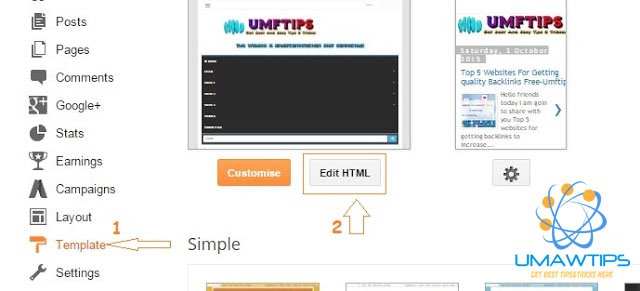
  • After this click on Tamplate (1) Button as shown in image and click on Edit HTML (2)


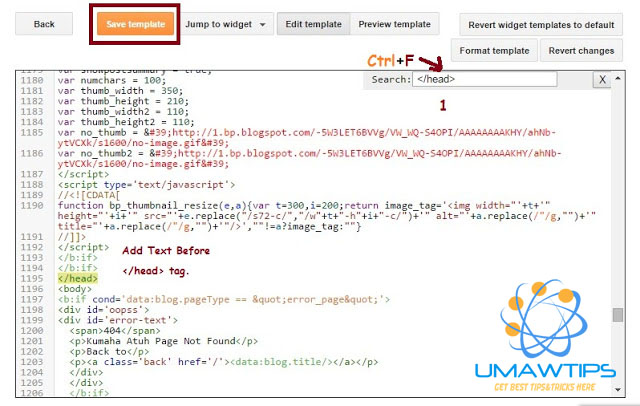
  • After This Search for  </head> tag as shown in image.


Note : You Can search this tag by Pressing  Ctrl+F   Button.


  • Now copy or download Below codes  By Click on Download and paste it before </head> and click on save tampate.



<!--Visit For more http://umawtips.blogspot.com/-->
 <script src='http://code.jquery.com/jquery-1.10.2.min.js' type='text/javascript'/>

<link href='https://googledrive.com/host/0B_1mqJd2tC8qeDVzSnBJMDh5WUk' rel='stylesheet'/>


<script src='https://googledrive.com/host/0B_1mqJd2tC8qbGdmQzRZVGk3bXM' type='text/javascript'/>


<script type='text/javascript'>

//<![CDATA[
jQuery(document).ready(function ($) {
$('#default-usage .to-lock').sociallocker({

buttons: {order:["
facebook-like","twitter-tweet","google-plus"]},


twitter: {url:"http://umawtips.blogspot.com/"},

facebook: {url:"http://umawtips.blogspot.com/"},
google: {url:"http://umawtips.blogspot.com/"},

text: {

header: "Visit For More http://umftips.blogspot.com/",
message: "This content is locked. Like us on Facebook, Twitter or Google plus to unlock it."
},

locker: {close: false, timer: 0,},


theme: "
Starter"


});

});
//]]>
</script>
<!--Visit For more http://umawtips.blogspot.com/-->


  • Replace Yellow colour text with your facebook,Twitter and google Plus Urls.
  • Replace Red colour with Theme you like.Themes are given below  with preview.
  • Replace Pink colour if you wanted to change the order of buttons.


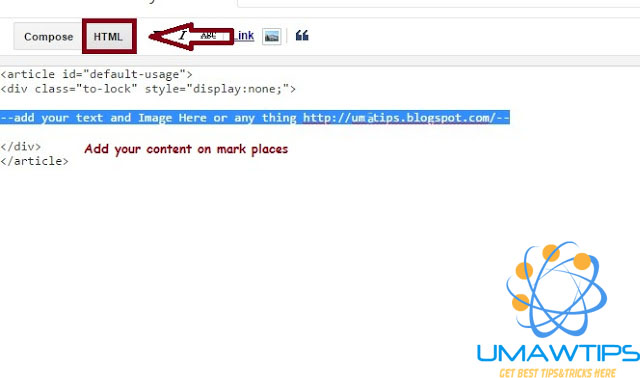
  • Now its time to come on the post side Add this code in html panal of your post as shown below


Note: This code is also Present in download file


  • Publish Your Post and Enjoy.

Theme Names
  • Flat                                                                                                                                              
  • Secrets                                                                                                                                         
  • Starter                                                                                                                                          
  • Glass                                                                                                                                             


If you want to change the themes of social content locker  Then change Red text with theme name in html code.


Last Words: Support us by  sharing this Post With your Friends!

Premium Social Sharing Wedgets For Blogger Free download

Premium Social Sharing Wedgets For Blogger Free download


Hello Friends today i am going to share with you a very beautiful  blogger wedgets with email subscribe.These days everyone wants to make their blog beautiful this wedget is perfectly suitable for the persion who want to make their blog beautiful.this wedget is also useful for the people who want to increase their social website traffic.


How to add this wedget to blogger.com:


Go to "  Blogger.com > click on"  Layout  " >Click on "  Add html Java scrips  " > Click on "  Save "   And Enjoy.


See below the coustomization of the wedget:
<style>
#sidebar-subscribe-box{width:300px;border:1px solid #aaa;border-radius:3px;padding:3px 0}
.sidebar-subscribe-box-wrapper{background:url(https://blogger.googleusercontent.com/img/b/R29vZ2xl/AVvXsEhabEnohP6eUcrZLc-Sunu6UftnCQLQy0nfts-nn9KtEAzvd1r6uGXKKqzRN0dRinuINxzRdTueha94pRcuY5CSYeDQf9UXYhTyQWRJ_mpKCsZMo1980wq-Oe0fXdLyb4dt0Tq4kB3LCSM/s1600/background.png) repeat scroll 0 0 #f7f7f7;color:#111;font-size:14px;line-height:20px;padding:1px 20px 10px;text-align:center;text-transform:uppercase}
.sidebar-subscribe-box-form{clear:both;display:block;margin:10px 0}form.sidebar-subscribe-box-form{clear:both;display:block;margin:10px 0 0;width:auto}
.sidebar-subscribe-box-email-field{-moz-border-radius:4px;-webkit-border-radius:4px;background:#fff url(https://blogger.googleusercontent.com/img/b/R29vZ2xl/AVvXsEhIN3oUgJHyMwPyKCyiVNGMGCkaWcBZL81nVcbnBt8DBnuevV1YAPXPpcGMDY7_Eqj-f5Cw6GdKX02GBREpHKpoAD4Bc4Lrd50o8EWFzJm93t1x-gxK1QqKVTmEhiKDhXwVI-VLeJV2ky0/s1600/icons.png) no-repeat 0 -27px;border:1px solid #ccc;border-radius:4px;color:#444;margin:0 0 15px;padding:10px 40px;width:68%}
.sidebar-subscribe-box-email-button{background:#09f;border:1px solid #007fff;box-shadow:0 1px 0 rgba(255,255,255,0.3) inset, 0 1px 0 transparent;color:#fff;cursor:pointer;font-family:verdana;font-weight:700;padding:10px;text-shadow:1px 1px 0 rgba(0,0,0,.4);text-transform:uppercase;width:100%}
.sidebar-subscribe-box-email-button:hover,.sidebar-subscribe-box-email-button:focus{background:#1ca4ff}
.sidebar-subscribe-box-email-button:active{-moz-box-shadow:0 1px 4px rgba(0,0,0,0.5) inset;-webkit-box-shadow:0 1px 4px rgba(0,0,0,0.5) inset;box-shadow:0 1px 4px rgba(0,0,0,0.5) inset;outline:0}iframe,object,embed,.yt-border iframe,.yt-border object,.yt-border embed,table{width:100%}embed{border-radius:3px;-moz-box-shadow:0 2px 4px rgba(0,0,0,0.2);-webkit-box-shadow:0 2px 4px rgba(0,0,0,0.2);background:#FFF;border:1px solid #ddd;box-shadow:0 2px 4px rgba(0,0,0,0.2);margin:0;padding:4px 4px 4px}
#footer-section{border-top:1px solid #aaa;box-shadow:inset 0 4px 6px -3px #aaa;font-family:cambria;font-size:14px;height:100px;margin:10px -30px 5px;padding:0 30px;text-align:center;width:100%}
a.social-icons{margin-right: 5px;height:45px;width:45px;}
a.social-icons:hover { opacity: .7; filter:alpha(opacity=70);}
</style>

<div id=”sidebar-subscribe-box”>
<div class=”sidebar-subscribe-box-wrapper”>
<br/>
<a class=”social-icons” target=”blank” href=”https://www.facebook.com/umawtips“><img src=”https://blogger.googleusercontent.com/img/b/R29vZ2xl/AVvXsEh__C-rp1MwSy61s2ai7HLcLVKsovjU_Rt3ffqJQf5e7vACl0FmItNNiqPsDuDkHdIyMKUUS5gtNFDml58aZNtc8JdBtpcRmd-WVSe_RIrrw0Kl72VVF1Rc97ikJoZ_fzvLLSvdSNGtoTJT/s1600/Bloggertrix-facebook.png” /></a>
<a class=”social-icons” target=”blank” href=”https://twitter.com/umawtips“><img src=”https://blogger.googleusercontent.com/img/b/R29vZ2xl/AVvXsEhCaDqonCVQSTe2GUuKc0vlnpKyHUt7q5EVyuVSkP5UObcn4qoIU6HlbNlPMDkxrbxjC1tvRgwwCPJBLXeKoE12gmi9yMg5FgeSzva9wYBt_dbG7relfTc_kQXwMeoo1U3L47o_14nUfUMw/s1600/bloggertrix-twitter.png” /></a>
<a class=”social-icons” target=”blank” href=”https://plus.google.com/u/0/1086283185168789“><img src=”http://3.bp.blogspot.com/–KlnPhT6pRA/USDjvgwOluI/AAAAAAAAAZM/_O8TI0WivQk/s1600/Bloggertrix-Googleplus.png” /></a>
<a target=”blank” class=”social-icons” href=”http://www.feedburner.com/umawtips“><img src=”https://blogger.googleusercontent.com/img/b/R29vZ2xl/AVvXsEg7fEBa9_BWVItOAKUZS75xuuQ35TC1XzbBOc8kLDf2cpvj2-P6Ku18EFRiiBoe1U2BucPgGNAQC_7WBi5WFhwpw2AvWoMoHe2KEEsW5l3JohM-nD8Uld2AI2UrJYKdus9GU_NJSTAb6O7W/s1600/Bloggertrix-Rss.png” /></a>
<p>Subscribe To Our Email Newsletter & Receive Updates Free</p>
<div class=”sidebar-subscribe-box-form”><form action=”http://feedburner.google.com/fb/a/mailverify?uri=umawtips” class=”sidebar-subscribe-box-form” method=”post” onsubmit=”window.open(‘http://feedburner.google.com/fb/a/mailverify?uri=umawtips‘, ‘popupwindow’, ‘scrollbars=yes,width=550,height=520’);return true” target=”popupwindow”><input name=”uri” type=”hidden” value=”umawtips” />
<input name=”loc” type=”hidden” value=”en_US” /><input class=”sidebar-subscribe-box-email-field” name=”email” autocomplete=”off” placeholder=”Enter your email address here”/>
<input class=”sidebar-subscribe-box-email-button” title=”” type=”submit” value=”Subscribe Now !” /></form>
</div></div></div>


Coustomization of Social Sharing wedget:


Now we need to coustomize this wedget 


  1. Replace Black colour umawtips with your twitter username.
  2. Replace Sky blue with your facebook username.
  3. Replace Blue colour line with your google plus link.
  4. Replace Both Green colour umawtips with your feed burner url.


LAST WORDS:

Now feel free and share this post with your friends!